 Micah's Malwr Club
18 - Verifying Intel Microcode Versions
So, it used to be a bigger issue on OpenBSD and FreeBSD systems that cpu microcode was out-of-date. To fix it, you needed to manually configure some tunable settings and install an additional microcode pkg for Intel or AMD. In the newer versions of OPNSense this has been fixed with the official addition of the pkgs:
- os-cpu-microcode-amd
- os-cpu-microcode-intel
You can read more about the official documentation here:
And, the forum posts that lead up to this change with investigations from the users:
If you want to check what your current version of microcode is, and see if it is up-to-date, do the following:
$> kldload cpuctl
$> x86info -a | grep -i micro
Microcode version: 0x0000000000000021
In the above example, after loading the cpuctl kernel module, we query our cpu information and grep for the current microcode version.
My version is shown as 0x21. We can then check the Intel Processor Microcode Package repository to find what version we should be on:
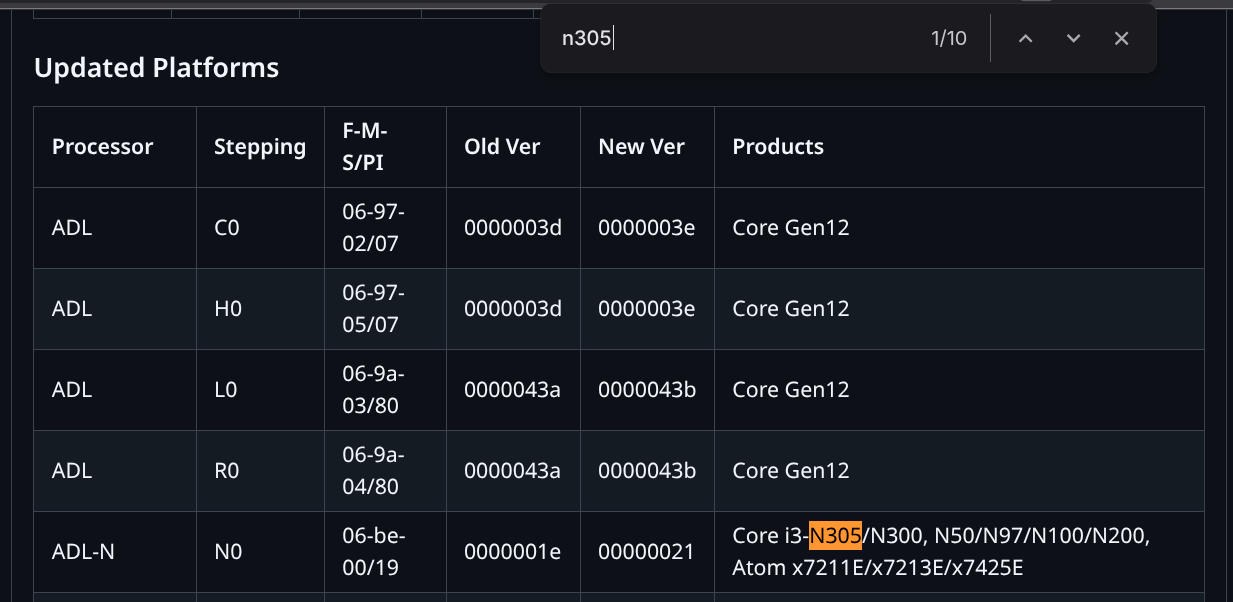
I am using the N305, so, after searching for it we can see that the old version was 0x1e and the current version is 0x21!
That means we have the latest available version :)